Posts

SysQuery::findOrCreateRange() - A better way to create dynamic query ranges

When creating dynamic query ranges in X++, it is considered a best practice to create a range only if it has not been already created. I have seen examples of code where the addRange() method is called inside an executeQuery() method. This has a performance hit and should be avoided. The best approach is to create the range in the init() of the datasource. In the executeQuery(), we can find the range first, if it does not exists or has not been created at that point, create a new one and apply the values. I found a helper method on the SysQuery class which did exactly this. The method is SysQuery::findOrCreateRange(). The method takes two parameters, a datasource to add the range to and the range itself. It returns a range object.

Performance – find() vs. exist() method

Someone asked me what is the need to have an exist() method when we have a find() method already declared on a table? Logically, exist() checks if a record with a given key exists and find also nearly does the same thing, it fetches the actual record? So why the need for an exist() method? Well, the answer is performance . The find() method always returns a buffer of the table on which it is called whereas if you look at the syntax of the exist() method, it only returns the RecId. Selecting only a single field versus the entire table takes less time. On my test machine, calling the exist() method on CustTable with 2000 records finished in 0.0136 milliseconds whereas find() took 0.1388 milliseconds. The rule of thumb is, querying on any indexed field will always be faster than a non-indexed field. So, even if the exist() method on CustTable was selecting AccountNum or PartyId, it would return in 0.0136 m/s only. Performance degrades only when you mix fields, so selecting (RecId, Name) w...

Enhanced SysTableBrowser - View only the fields you want in table browser

Image
While debugging, I sometime open the table browser in another AX instance to look at table data directly. What I found annoying was that when tables had a number of fields, I had difficulty viewing them all. Say for example, I’m looking through InventTrans and am interested in looking only the values of ItemId, TransRefId & InvoiceId. It would have been nice if I was able to look at only these fields. So I went about and customized the SysTableBrowser form to my needs. I’ve added two buttons to the form, one lets you select the fields you want to show for the currently open table. The other button just resets the field list. You can download this project from here .

Crossword generator in Dynamics AX

Image
While iterating through the AOT, I came upon this class SysHelpCrosswordEngine . I never knew AX had a crossword generation engine (why will we need one anyway). After testing it for 5 minutes, I successfully generated my own crossword. Well, I wasn’t obviously satisfied because I fed in the questions and I already knew the answers. So I wondered if there was a way to let AX generate a crossword for me, well it seems there is. Here is where another class SysHelpBookCrossword comes into picture. I let it generate a crossword for me on the intrinsic functions available in AX. I had to tweak one of the class to get the results. AX generated a crossword with 50 questions. It outputs a html file to the C: drive named cross.htm You can find the attached project here . Have fun.

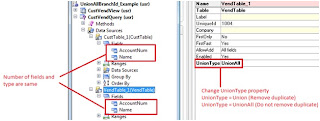
The unionAllBranchId field of queries and views.

Image
With Dynamics AX 2009, the union of queries was supported. This made it possible to retrieve similar data from multiple data sources. To create a union query, we have to set the QueryType property of the query to Union . We can set the UnionType property on the datasources to either Union or UnionAll . Union will ensure that duplicate records are filtered out whereas UnionAll will include duplicate records as well. Care should be taken that the number of fields and their types should match in all the datasources. In my example, I have added CustTable and VendTable as the datasources and just kept AccountNum & Name as the available fields. Now, we can run the Query in a job and we will be able to see both Customer & Vendor account numbers and names. Now is there a way to identify whether the account & name belongs to a customer or a vendor. This is where the unionAllBranchId field of a query can be used. This is an integer field which returns the branch number of the datas...

Writing to the Windows event log from within Dynamics AX.

Image
The workflow runtime in AX 2009 will log any error it encounters to the Windows event log. We can log to the event log using .Net classes. The System.Diagnostics.EventLog class provides methods to do this. To create an event log instance, we write the following line of code ev = new System.Diagnostics.EventLog("Application"); ev.set_Source("Dynamics Server 01"); Here Application is the log we want to write into and Dynamics Server 01 is the source of the message. You write a message to the log using the following line ev.WriteEntry(msg, entryType); In the above line, msg is the message you want to output and entryType is an enum value of type System.Diagnostics.EventLogEntryType which can be a warning, error or Information. You can download the job for this from here .

How to find if a table is mapped in a map?

Sometimes we would like to know if a particular table is mapped in a map. To achieve this, SysDictTable::isTableMapped() method can be used. This method takes two parameters, the map name and the table which we want to check if it is mapped. SysDictTable::isTableMapped(tablenum(AddressMap), tablenum(LedgerTable)); SysDictTable::isTableMapped(tablenum(AddressMap), tablenum(CustTable)); The first statement will return false since LedgerTable does not have a mapping in AddressMap map. The second statement will return true since the CustTable fields have a mapping in the AddressMap map. Note how the tablenum() function can also be used to return the id of a map.