Posts

Form templates in Dynamics AX 2012
Image
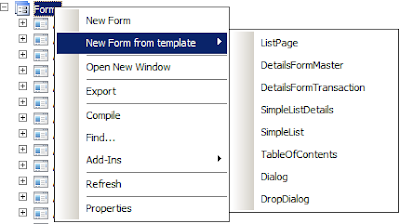
A primary focus in Dynamics AX 2012 was to increase a developer's productivity by automating common tasks. As part of this initiative, a new feature was introduced in Dynamics AX 2012 in the AOT. This is the creation of new forms using form templates. If you right click on the form node, you can see an extra option there - New Form from template As seen in the image above, you have an option to create seven different form based on the pre-defined templates, these are ListPage DetailsFormMaster DetailsFormTransaction SimpleListDetails SimpleList TableOfContents Dialog DropDialog Let us look at these in more details. ListPage - A list page is a form that displays a list of data related to a particular entity or business object. A list page provides provisions for displaying data and taking actions on this data. Every module has at least a couple of list pages. List pages are further classified as primary and secondary list pages. A secondary list page will only displa...

Debug BP errors in Dynamics AX 2012

Image
With Dynamics AX 2012, some new BP errors have been introduced. Often, while fixing BP errors, I turn to the List of Best Practice Error and Warning Messages page on MSDN for help. But what if you are getting a BP error and there is no clear description on how to fix it. In such scenarios, I always debug the BP error and try to see what is causing this BP error in the first place. Let us do this with a simple example. On a Dynamics AX 2012 machine, Create a table with just two fields, ItemId and Name. Create a normal relation on the table with InventTable on ItemId == InventTable.ItemId On running the BP check on this table, among other BP errors, you will receive this new to Dynamics AX 2012 BP error - Only foreign key constraints are allowed on this table. Some of you may know the reason why this BP error is being thrown. For those who do not know the reason, please hold on to that doubt, I'll explain it shortly in the end. Let us get back to the original topic of th...

Regular expressions in Dynamics AX

Image
In all versions of Dynamics AX, the Find window supports regular expressions. Recently I discovered that even the label editor supports regular expressions. Using regular expressions in the find window and the label editor can significantly reduce your search times and you can narrow down your search to exactly what you are searching for. Let us look at some example. Suppose I want to search for all classes which have methods which are named like the following, enable(Any text here)Buttons. So all names like enableActivityButtons, enableDisableButtons, enableAllButtons etc should be found. So, we first need to analyze our expression requirement. Our search string should start with enable . For that, we need to enter <enable . The < character matches the specified string at the start of the string. Similiarly, for matching Buttons at the end of the string, we need to specify Button> . The > character matches the specified string before it at the end of the ...

The field with ID '0' does not exist in table - Cause and resolution.

Image
Hello readers, In Dynamics AX coding, you should have come across this error sometime - The field with ID '0' does not exist in table 'SomeTable' So what causes this error and what is the possible resolution to it? Well, the most likely cause for this error is a missing mapping in a table map. Let us look at an example. I've a simple Map named CustVendAccount with one Account field. I've created two mappings - one with CustTable's AccountNum field and for the otehr mapping, I just specify VendTable but no field. This is how my map looks like, Now, I've a simple job which just passes either CustTable or VendTable as an argument and then we print the Account field in the map. static void CustVendAccountMap(Args _args) { CustTable custTable; VendTable vendTable; void readMap(CustVendAccount _custVendAccount) { info(strFmt("Value from table %1 is %2",tableId2name(_custVendAccount.TableId), _custV...

Problem caused by using keyword as object name in Dynamics AX

Hello Readers, When creating objects in Dynamics AX, it is advisable to use names which are not any keywords in Dynamics AX. Otherwise, you can end up with unexpected behavior. A list of all keywords in Dynamics AX 2012 can be found here . I discovered one such issue in standrd Dynamics AX. Take a look at the table InventBuyerGroup. It has two fields named Group & Description. Now suppose if I want to select the field Group from the table using a select statement, how will I do it? InventBuyerGroup inventBuyerGroup; select group from inventBuyerGroup; Simple, So what is the catch you may ask? Well, the above statement will not compile and give an error . That is because the field name group is also a keyword in Dynamics AX. So, the compiler gets confused and cant understand that it is the field name that we are trying to refer here. I'm not aware of any way of getting this work. Of course, there are workarounds like using a map but is that really needed? We ca...

New number sequence not visible in Dynamics AX 2012. How to fix it?

Hello readers, In Dynamics AX 4.0 and Dynamics AX 2009, if you created a new number sequence reference, you would restart the AOS to see the new number sequence reference in the parameters form of your module. That was all you had to do to get the new reference reflected. Try the same in Dynamics AX 2012 and you will be pleasantly suprised(or maybe bewildered) to not find the number sequence reference showing in the parameters form. This is because the numberSequence tables are no longer populated when you restart the AOS. This was an additional task that was done in Dynamics AX 4.0 and Dynamics AX 2009 everytime you restarted the AOS. In Dynamics AX 2012, the number sequence tables are populated when you select the appropriate task in the initialization checklist. So, how do we work around this issue? Simple. Just call the load() method on your module's number sequence class. For example, suppose I've added a new number sequence to the Sales and Marketing module(CR...

Futures class in Dynamics AX

Image
In Dynamics AX, if you want to find a date in a period, chances are you would be using the DateTimeUtil class. Say, I want to find the date 3 months exactly from today. Assuming a month is of 30 days, I can call the DateTimeUtil::addDays() method. So my code to get that will be, print DateTimeUtil::date(DateTimeUtil::addDays (DateTimeUtil::utcNow(), 3 * 30)); There is another application class in Dynamics AX, which does exactly this. This is the Futures class. Let us see this class in action. static void FuturesClass(Args _args) { Futures future; int i; // Setup a future class object with 365 days as a period future = new Futures(systemDateGet(), 365, PeriodUnit::Day); future.next(); info(strFmt("Future date after 3 months from today is %1",future.transDate())); // Setup a future class object with 1 year as a period future = new Futures(systemDateGet(), 1, PeriodUnit::Year); f...