The unionAllBranchId field of queries and views.
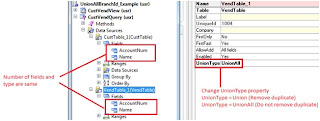
With Dynamics AX 2009, the union of queries was supported. This made it possible to retrieve similar data from multiple data sources. To create a union query, we have to set the QueryType property of the query to Union . We can set the UnionType property on the datasources to either Union or UnionAll . Union will ensure that duplicate records are filtered out whereas UnionAll will include duplicate records as well. Care should be taken that the number of fields and their types should match in all the datasources. In my example, I have added CustTable and VendTable as the datasources and just kept AccountNum & Name as the available fields. Now, we can run the Query in a job and we will be able to see both Customer & Vendor account numbers and names. Now is there a way to identify whether the account & name belongs to a customer or a vendor. This is where the unionAllBranchId field of a query can be used. This is an integer field which returns the branch number of the datas...