Posts

Showing posts with the label Dynamics AX 2012

Cumulative update pack 2 for Microsoft Dynamics AX 2012

Cumulative update pack 2 for Microsoft Dynamics AX 2012 has been released. This pack contains close to 70 fixes for various bugs. The pack also contains the cumulative update pack 1 for Microsoft Dynamics AX 2012 which was released earlier. The build number after applying this pack will be 6.0.947.280 You can download the pack and read more about the fixes in the pack here .

Set financial dimension values through code in AX 2012

Image
In Dynamics AX 2012, the dimensions framework has gone for a complete makeover. We can now have an unlimited number of financial dimensions. In Dynamics AX 4 and Dynamics AX 2009, the dimensions were actually stored as an array of string fi?>elds. This has changed in Dynamics AX 2012 where the dimension is stored as a recid. Recently I came across a requirement where if the CostCenter dimension was set to a particular value, the department dimension's value should change to a different value and vice versa. I developed the code and thought it will be a good idea to share it here. My requirement was in the ProjTable form but you can use this code in any of your form which uses the default financial dimensions. Override the DefaultDimension field's dataChanged() method on your main datasource and add the below code. // Financial dimension change code - Zubair - Begin public void dataChanged() { DimensionAttribute dimToBeChanged; DimensionAttributeValue dimAttr...

“Day in the Life Benchmark” available for download

Microsoft has recently released the Day in the Life Benchmark documents on PartnerSource. You can read more about it on the Dynamics Ax Performance Team Blog . The benchmark numbers shared there are really encouraging and truly shows that Dynamics AX 2012 is a robust and agile erp platform to base your business on. Note: PartnerSource or CustomerSource login is required.

Get selected records in Dynamics AX 2012

Image
In my earlier post, we discussed how we can retrieve all selected records on a list page. You can read that post here . Retrieving all selected records from a caller form is very easy. The code for this can be found in a number of places in standard Dynamics AX codebase. The general approach is to use the dataSource.getFirst(1) statement to get the first selected record and loop through the remaining using dataSource.getNext() . In Dynamics AX 2009, a new class was introduced for this purpose. This was the MultiSelectionHelper class. In Dynamics AX 2012, another new class has been introduced to retrieve the selected records. This is the MultiSelectionContext class. The MultiSelectionHelper class is an application class. It presents two constrcutors. The standard constructor method just creates a new instance of the MultiSelectionHelper class. When this construct is used, you will have to explicitly set the dataSource to be used for fethcing selected records. This can be done...

New security model in Dynamics AX 2012

Image
In Dynamics AX 2012, one of the key area that has gone a total overhaul is Security. In Dynamics AX 4.0 and Dynamics AX 2009, the security model was module based. Users were assigned to user groups which grouped permissions to the various objects. These permissions were controlled by security keys. The biggest drawback of this model was that you could not have the same security user group apply across multiple companies. You still had to create the same user group across different groups. With Dynamics AX 2012, all this has changed. The security model in Dynamics AX 2012 is role based. This means that you can relate the day to day business processes to roles. Users are assigned to roles. Roles contain a group of duties or privileges. It is logically very easy now to configure security in Dynamics AX 2012. The Security keys in the AOT are now obsolete in Dynamics AX 2012. It is present for backward compatibility. If you right click on the Security keys node, you dont have an option ...

How to get list page's datasource in Dynamics AX 2012?

Image
Recently, I had a requirement where I needed to disable a button on a list page if the records selected did not meet a particular condition. Let me explain you this with an example. Say I have a new button on the Projects list page. This button should be enabled only if all projects selected have the same project contract ID. If the contract ID is different for the selected projects, the button should be disabled. So how can we achieve this? On a form, this can be done in a very straight forward way. Just loop through all the selected records and check if the project contract IDs are different. If they are, just disable the button. But on a list page, the form datasource is not readily available. After some investigation, I found out a way of doing this. As you must be knowing, all list pages in Dynamics AX 2012 are controlled via interaction classes. This is the new framework model. If you are new to this and dont know about these, I'll recommend you learn more on this on the H...

QueryDataSourceStr - new intrinsic function in Dynamics AX 2012

There is a new intrinsic function introduced in Dynamics AX 2012. This is the QueryDataSourceStr() function. This function returns a string of the datasource name. The queryDataSourceStr() function checks if the supplied datasource name exists in the query in the AOT or not. An important point to note here is that all the intrinsic functions like formStr, classStr, queryStr and queryDataSourceStr invoke real time compiler check. This means that the compiler checks for the existence of the object in the AOT as soon as the function call is completed. In case the object name is not found, an error is shown immediately by displaying a red squiggly line.

Form templates in Dynamics AX 2012

Image
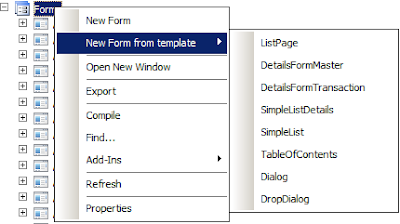
A primary focus in Dynamics AX 2012 was to increase a developer's productivity by automating common tasks. As part of this initiative, a new feature was introduced in Dynamics AX 2012 in the AOT. This is the creation of new forms using form templates. If you right click on the form node, you can see an extra option there - New Form from template As seen in the image above, you have an option to create seven different form based on the pre-defined templates, these are ListPage DetailsFormMaster DetailsFormTransaction SimpleListDetails SimpleList TableOfContents Dialog DropDialog Let us look at these in more details. ListPage - A list page is a form that displays a list of data related to a particular entity or business object. A list page provides provisions for displaying data and taking actions on this data. Every module has at least a couple of list pages. List pages are further classified as primary and secondary list pages. A secondary list page will only displa...

Debug BP errors in Dynamics AX 2012

Image
With Dynamics AX 2012, some new BP errors have been introduced. Often, while fixing BP errors, I turn to the List of Best Practice Error and Warning Messages page on MSDN for help. But what if you are getting a BP error and there is no clear description on how to fix it. In such scenarios, I always debug the BP error and try to see what is causing this BP error in the first place. Let us do this with a simple example. On a Dynamics AX 2012 machine, Create a table with just two fields, ItemId and Name. Create a normal relation on the table with InventTable on ItemId == InventTable.ItemId On running the BP check on this table, among other BP errors, you will receive this new to Dynamics AX 2012 BP error - Only foreign key constraints are allowed on this table. Some of you may know the reason why this BP error is being thrown. For those who do not know the reason, please hold on to that doubt, I'll explain it shortly in the end. Let us get back to the original topic of th...

New number sequence not visible in Dynamics AX 2012. How to fix it?

Hello readers, In Dynamics AX 4.0 and Dynamics AX 2009, if you created a new number sequence reference, you would restart the AOS to see the new number sequence reference in the parameters form of your module. That was all you had to do to get the new reference reflected. Try the same in Dynamics AX 2012 and you will be pleasantly suprised(or maybe bewildered) to not find the number sequence reference showing in the parameters form. This is because the numberSequence tables are no longer populated when you restart the AOS. This was an additional task that was done in Dynamics AX 4.0 and Dynamics AX 2009 everytime you restarted the AOS. In Dynamics AX 2012, the number sequence tables are populated when you select the appropriate task in the initialization checklist. So, how do we work around this issue? Simple. Just call the load() method on your module's number sequence class. For example, suppose I've added a new number sequence to the Sales and Marketing module(CR...

How to refer to form controls in code without setting the AutoDeclaration property in Dynamics AX?

Hello readers, On a Dynamics AX form, if you want to refer to a particular control in code, the surest way you would take is to set the AutoDeclaration property to Yes. This will let you refer the control in code. There is nothing wrong with this approach and it is quite common in standard Dynamics AX codebase. But in some cases, it is preferred not to use this approach. So what is this case? Consider a scenario where you are customizing a standard form. You want to disable a particular field based on a field value. To achieve this, - You will set the AutoDeclaration property of the control to Yes - In the active method of the datasource, you will disable the control based on a condition. Now, the active() method's modification can be easily seen in the AOT but the change in property isn't readily noticed unless you perform a layer compare. Normally, in cuztomization it is a best practise to add customization tags to show what part is customized code and what is...

Dynamics AX 2012 price list

Hi readers, For all of you who were interested in knowing the cost of a Dynamics AX 2012 license, well, the wait is over. Microsoft has provided a nice little Excel sheet which can help you estimate the cost of your implementation. You just need to enter the quantity of components you wish to procure and the sheet will calculate the cost for you. You can download the sheet from here . Note: PartnerSource login required.

Cumulative Update pack 1 for Microsoft Dynamics AX 2012 released

Just days after the general availability of Microsoft Dynamics AX 2012, a cumulative update pack has been released for Microsoft Dynamics AX 2012. This pack contains close to 80 fixes to various bugs. You can download the pack and read more about the fixes in the pack here . Note: PartnerSource credentials required.

How to add or delete a label file in Dynamics AX 2012

Image
By now, you all must be aware that we are done with AOD files in Dynamics AX 2012. Model is the new deployment option for deploying AX objects on various installations. If you want to learn more about models, MFP has an excellent three part series on it which you can read here . In this post we will look at how label files are contained within models in Dynamics AX 2012. We now have a new node in AOT - Label Files All labels in the system are grouped under this node. Now suppose we have a label from another installation which we want to bring in to our system. Right click on the Label Files node and select Create from File . Browse and selct your .ald file. Once you select the file and hit OK, a new node is added under the Label Files node corresponding to the label file imported. You will get an info message saying " Imported label file:C:\Users\Administrator\Desktop\MyLabelen-us.ald " In AX 2009, after placing a label file, we needed to restart the AOS so that the...

Dynamics AX 2012 - The AutoRefreshData property on buttons

Image
In yesterday's post , we learnt about the NeedsRecord property on buttons. This is a new property introduced in Dynamics AX 2012. Today we will learn about another new property on buttons in Dynamics AX 2012 - the AutoRefreshData property. So what does this property do? The help text for the property says " If yes, the data in the datasource associated with this button is refreshed after the button is clicked. " Well that explains it. With this property on, any datasource associated with the button is refreshed when the button is clicked. Consider a scenario, where on clicking a button, an edit form opens and allows the user to edit certain field values. After the form is closed, the values in my master form will auto refresh. My initial assumption was that setting the AutoRefreshData property will eliminate the need to explictly call refresh/research after a button was clicked. I found out that this isn't the case and I was wrong . Let us look at this in more detai...

New feature in Dynamics AX 2012 - NeedsRecord property on Buttons.

Image
In Dynamics AX 4.0 and 2009, if a button's action depended on a record being present, we usually added code in the executeQuery() method of the datasource to check for the existence of a record. If a record was not found, the button was disabled. Scenarios like these required specific code to be written by the developers. With Dynamics AX 2012, this has change. There is a new property NeedsRecord introduced on all button controls, these include your plain buttons, menu item buttons and command buttons as well. Menu button groups do not have this property. The NeedsRecord property works in conjunction with the DataSource property. Now we know that the normal buttons and command buttons do not have a DataSource property? So what happens in that case? The answer is the DataSource property is inherited from the parent of the button. This could be a button group or a tab page. If the button group also doesn't have the DataSource property set, then the kernel looks for the next pa...

How to check project budget amount through code in Dynamics AX 2012?

Image
In my earlier post, I had shown how easy it is to enable budget control on projects. You can read that here . I got a couple of questions on it and I thank my readers for the interest. I found one of the question to be very generic and the scenario described was something which many customers may be doing. The scenario given was, The customer creates a lot of project transactions on a daily basis but posting of them is done through a batch only on the month end. So the customer has allocated an approved budget of 1000. We have 20 journals each with an amount of 100. Now we post these journals in a batch. So, after posting 10 journals, the whole budget will be exhausted. So from the 11th journal onwards, we will be receiving an error that budget will be exceeded by 100. Now the question was, is there any way to know before hand while creating the transaction that there isn't a sufficient budget and hence the transaction will not be posted. Well, it surely can be done with a little c...

Hands on - How to enable budget control on projects in Dynamics AX 2012?

Image
In Dynamics AX 2009, there was no out of the box support for budget control. That has changed in Dynamics AX 2012. We now have a ledger budget control framework which is nicely integrated with the other new frameworks in Dynamics AX 2012. The Project management and accounting module has built in budget control support. We just need to configure the budget parameters, allocate and approve an amount and the framework takes care of the rest. In this post, I'll walk you through how to activate budget control on a project. Open the projects list page by going to Project management & accounting -> All projects Create a new project by clicking the new button and enter the following values as seen in the image. We will have to enable budget control on the project. To do this, expand the Budget and forecast tab. Select the Use budget control check box, set Budget overrun default field to Disallow overruns. Set the project stage to In process. To do this, select In process from the...

Employee self services feature demo in Microsoft Dynamics AX 2012

The Employee self services portal in Microsoft Dynamics AX 2012 is the centralized location for all employees of the organization to go about performing common tasks. Employees can order products, submit their expenses, approve expense reports & other documents or navigate and submit their timesheets. There is a video available on this here Go check it out and share your thoughts.