Posts

Book review: Developing SSRS Reports for Dynamics AX

Recently, I got a chance to review another book on developing SSRS reports for Dynamics AX 2012 - Developing SSRS Reports for Dynamics AX . This book is authored by Mukesh Hirwani This book is a good starting point if you are new to SSRS report development in Dynamics AX 2012 as it covers all topics related to the subject. The book uses a practical hands on approach and Mukesh gets right into business by showing pracitically how it is done with screen shots. Apart from the standard auto and precision designs, there is a section on creating matrix, chart and drill through reports. UI designing using the new UIBuilder framework in Dynamics AX 2012 is also covered. Finally, there is a section for report deployment and maintenance with best practices. I'll definitely recommend this book as a readily available guide to start with SSRS report development in Dynamics AX 2012. To read more about the book click here

Book review: Dynamics AX 2012 reporting cookbook

Today I got a chance to review another book from Packt publications. This book is on SSRS report development titled Dynamics AX 2012 reporting cookbook by Kamalakannan Elangovan. This book is a collection of 50+ techniques to get you up and running with report development using SSRS in Dynamics AX. Some of the great features of this book are, Develop all kind of reports ranging from autodesign, matrix, multicolumn, line and gauge reports Learn how to use query, RDP, XML feeds and OLAP cubes as datasources for your reports Learn how to use SQL report builder for creating reports Learn how to upgrade reports from previous versions to Dynamics AX 2012 Learn how to add dimensions to reports Learn how to assess report performance and improve them The language is very fluid and there are clear illustrations to help the reader. Also, every topic has clear code snippets to explain the code in detail. If you are serious about improving your report development skills and want to be...

Book review: Extending Microsoft Dynamics AX 2012 Cookbook

Back in the days of Dynamics AX 4.0 & Dynamics AX 2009, developers had few choice when picking a good book to learn Dynamics AX development. My personal choice was the Inside Dynamics AX book from the Microsoft press and the Microsoft Dynamics AX cookbook by Mindaugas Pocius. Packt publications have been publishing a lot of cookbooks on various topics in Dynamics AX. They have more than 10 books on various topics in Dynamics AX. Recently I got a chance to review one of their book - Extending Microsoft Dynamics AX 2012 Cookbook by Murray Fife . As the name suggests, this book is not specific about Dynamics AX, but how to extend Dynamics AX with other Microsoft technologies like SharePoint reporting tools like Power View and Power Pivot creating various analytical dashboards and BI scorecards collaborating with MS Outlook & Lync creating help documents for your customization creating web services in Dynamics AX organizing workflows creating role centers in Dynami...

Cumulative update pack 2 for Microsoft Dynamics AX 2012

Cumulative update pack 2 for Microsoft Dynamics AX 2012 has been released. This pack contains close to 70 fixes for various bugs. The pack also contains the cumulative update pack 1 for Microsoft Dynamics AX 2012 which was released earlier. The build number after applying this pack will be 6.0.947.280 You can download the pack and read more about the fixes in the pack here .

Set financial dimension values through code in AX 2012

Image
In Dynamics AX 2012, the dimensions framework has gone for a complete makeover. We can now have an unlimited number of financial dimensions. In Dynamics AX 4 and Dynamics AX 2009, the dimensions were actually stored as an array of string fi?>elds. This has changed in Dynamics AX 2012 where the dimension is stored as a recid. Recently I came across a requirement where if the CostCenter dimension was set to a particular value, the department dimension's value should change to a different value and vice versa. I developed the code and thought it will be a good idea to share it here. My requirement was in the ProjTable form but you can use this code in any of your form which uses the default financial dimensions. Override the DefaultDimension field's dataChanged() method on your main datasource and add the below code. // Financial dimension change code - Zubair - Begin public void dataChanged() { DimensionAttribute dimToBeChanged; DimensionAttributeValue dimAttr...

“Day in the Life Benchmark” available for download

Microsoft has recently released the Day in the Life Benchmark documents on PartnerSource. You can read more about it on the Dynamics Ax Performance Team Blog . The benchmark numbers shared there are really encouraging and truly shows that Dynamics AX 2012 is a robust and agile erp platform to base your business on. Note: PartnerSource or CustomerSource login is required.

Get selected records in Dynamics AX 2012

Image
In my earlier post, we discussed how we can retrieve all selected records on a list page. You can read that post here . Retrieving all selected records from a caller form is very easy. The code for this can be found in a number of places in standard Dynamics AX codebase. The general approach is to use the dataSource.getFirst(1) statement to get the first selected record and loop through the remaining using dataSource.getNext() . In Dynamics AX 2009, a new class was introduced for this purpose. This was the MultiSelectionHelper class. In Dynamics AX 2012, another new class has been introduced to retrieve the selected records. This is the MultiSelectionContext class. The MultiSelectionHelper class is an application class. It presents two constrcutors. The standard constructor method just creates a new instance of the MultiSelectionHelper class. When this construct is used, you will have to explicitly set the dataSource to be used for fethcing selected records. This can be done...

New security model in Dynamics AX 2012

Image
In Dynamics AX 2012, one of the key area that has gone a total overhaul is Security. In Dynamics AX 4.0 and Dynamics AX 2009, the security model was module based. Users were assigned to user groups which grouped permissions to the various objects. These permissions were controlled by security keys. The biggest drawback of this model was that you could not have the same security user group apply across multiple companies. You still had to create the same user group across different groups. With Dynamics AX 2012, all this has changed. The security model in Dynamics AX 2012 is role based. This means that you can relate the day to day business processes to roles. Users are assigned to roles. Roles contain a group of duties or privileges. It is logically very easy now to configure security in Dynamics AX 2012. The Security keys in the AOT are now obsolete in Dynamics AX 2012. It is present for backward compatibility. If you right click on the Security keys node, you dont have an option ...

How to get list page's datasource in Dynamics AX 2012?

Image
Recently, I had a requirement where I needed to disable a button on a list page if the records selected did not meet a particular condition. Let me explain you this with an example. Say I have a new button on the Projects list page. This button should be enabled only if all projects selected have the same project contract ID. If the contract ID is different for the selected projects, the button should be disabled. So how can we achieve this? On a form, this can be done in a very straight forward way. Just loop through all the selected records and check if the project contract IDs are different. If they are, just disable the button. But on a list page, the form datasource is not readily available. After some investigation, I found out a way of doing this. As you must be knowing, all list pages in Dynamics AX 2012 are controlled via interaction classes. This is the new framework model. If you are new to this and dont know about these, I'll recommend you learn more on this on the H...

QueryDataSourceStr - new intrinsic function in Dynamics AX 2012

There is a new intrinsic function introduced in Dynamics AX 2012. This is the QueryDataSourceStr() function. This function returns a string of the datasource name. The queryDataSourceStr() function checks if the supplied datasource name exists in the query in the AOT or not. An important point to note here is that all the intrinsic functions like formStr, classStr, queryStr and queryDataSourceStr invoke real time compiler check. This means that the compiler checks for the existence of the object in the AOT as soon as the function call is completed. In case the object name is not found, an error is shown immediately by displaying a red squiggly line.

Form templates in Dynamics AX 2012

Image
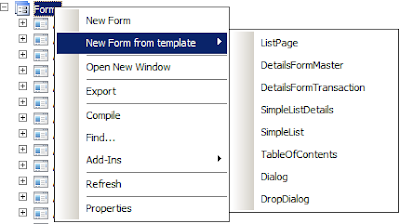
A primary focus in Dynamics AX 2012 was to increase a developer's productivity by automating common tasks. As part of this initiative, a new feature was introduced in Dynamics AX 2012 in the AOT. This is the creation of new forms using form templates. If you right click on the form node, you can see an extra option there - New Form from template As seen in the image above, you have an option to create seven different form based on the pre-defined templates, these are ListPage DetailsFormMaster DetailsFormTransaction SimpleListDetails SimpleList TableOfContents Dialog DropDialog Let us look at these in more details. ListPage - A list page is a form that displays a list of data related to a particular entity or business object. A list page provides provisions for displaying data and taking actions on this data. Every module has at least a couple of list pages. List pages are further classified as primary and secondary list pages. A secondary list page will only displa...

Debug BP errors in Dynamics AX 2012

Image
With Dynamics AX 2012, some new BP errors have been introduced. Often, while fixing BP errors, I turn to the List of Best Practice Error and Warning Messages page on MSDN for help. But what if you are getting a BP error and there is no clear description on how to fix it. In such scenarios, I always debug the BP error and try to see what is causing this BP error in the first place. Let us do this with a simple example. On a Dynamics AX 2012 machine, Create a table with just two fields, ItemId and Name. Create a normal relation on the table with InventTable on ItemId == InventTable.ItemId On running the BP check on this table, among other BP errors, you will receive this new to Dynamics AX 2012 BP error - Only foreign key constraints are allowed on this table. Some of you may know the reason why this BP error is being thrown. For those who do not know the reason, please hold on to that doubt, I'll explain it shortly in the end. Let us get back to the original topic of th...

Regular expressions in Dynamics AX

Image
In all versions of Dynamics AX, the Find window supports regular expressions. Recently I discovered that even the label editor supports regular expressions. Using regular expressions in the find window and the label editor can significantly reduce your search times and you can narrow down your search to exactly what you are searching for. Let us look at some example. Suppose I want to search for all classes which have methods which are named like the following, enable(Any text here)Buttons. So all names like enableActivityButtons, enableDisableButtons, enableAllButtons etc should be found. So, we first need to analyze our expression requirement. Our search string should start with enable . For that, we need to enter <enable . The < character matches the specified string at the start of the string. Similiarly, for matching Buttons at the end of the string, we need to specify Button> . The > character matches the specified string before it at the end of the ...

The field with ID '0' does not exist in table - Cause and resolution.

Image
Hello readers, In Dynamics AX coding, you should have come across this error sometime - The field with ID '0' does not exist in table 'SomeTable' So what causes this error and what is the possible resolution to it? Well, the most likely cause for this error is a missing mapping in a table map. Let us look at an example. I've a simple Map named CustVendAccount with one Account field. I've created two mappings - one with CustTable's AccountNum field and for the otehr mapping, I just specify VendTable but no field. This is how my map looks like, Now, I've a simple job which just passes either CustTable or VendTable as an argument and then we print the Account field in the map. static void CustVendAccountMap(Args _args) { CustTable custTable; VendTable vendTable; void readMap(CustVendAccount _custVendAccount) { info(strFmt("Value from table %1 is %2",tableId2name(_custVendAccount.TableId), _custV...

Problem caused by using keyword as object name in Dynamics AX

Hello Readers, When creating objects in Dynamics AX, it is advisable to use names which are not any keywords in Dynamics AX. Otherwise, you can end up with unexpected behavior. A list of all keywords in Dynamics AX 2012 can be found here . I discovered one such issue in standrd Dynamics AX. Take a look at the table InventBuyerGroup. It has two fields named Group & Description. Now suppose if I want to select the field Group from the table using a select statement, how will I do it? InventBuyerGroup inventBuyerGroup; select group from inventBuyerGroup; Simple, So what is the catch you may ask? Well, the above statement will not compile and give an error . That is because the field name group is also a keyword in Dynamics AX. So, the compiler gets confused and cant understand that it is the field name that we are trying to refer here. I'm not aware of any way of getting this work. Of course, there are workarounds like using a map but is that really needed? We ca...

New number sequence not visible in Dynamics AX 2012. How to fix it?

Hello readers, In Dynamics AX 4.0 and Dynamics AX 2009, if you created a new number sequence reference, you would restart the AOS to see the new number sequence reference in the parameters form of your module. That was all you had to do to get the new reference reflected. Try the same in Dynamics AX 2012 and you will be pleasantly suprised(or maybe bewildered) to not find the number sequence reference showing in the parameters form. This is because the numberSequence tables are no longer populated when you restart the AOS. This was an additional task that was done in Dynamics AX 4.0 and Dynamics AX 2009 everytime you restarted the AOS. In Dynamics AX 2012, the number sequence tables are populated when you select the appropriate task in the initialization checklist. So, how do we work around this issue? Simple. Just call the load() method on your module's number sequence class. For example, suppose I've added a new number sequence to the Sales and Marketing module(CR...

Futures class in Dynamics AX

Image
In Dynamics AX, if you want to find a date in a period, chances are you would be using the DateTimeUtil class. Say, I want to find the date 3 months exactly from today. Assuming a month is of 30 days, I can call the DateTimeUtil::addDays() method. So my code to get that will be, print DateTimeUtil::date(DateTimeUtil::addDays (DateTimeUtil::utcNow(), 3 * 30)); There is another application class in Dynamics AX, which does exactly this. This is the Futures class. Let us see this class in action. static void FuturesClass(Args _args) { Futures future; int i; // Setup a future class object with 365 days as a period future = new Futures(systemDateGet(), 365, PeriodUnit::Day); future.next(); info(strFmt("Future date after 3 months from today is %1",future.transDate())); // Setup a future class object with 1 year as a period future = new Futures(systemDateGet(), 1, PeriodUnit::Year); f...

How to refer to form controls in code without setting the AutoDeclaration property in Dynamics AX?

Hello readers, On a Dynamics AX form, if you want to refer to a particular control in code, the surest way you would take is to set the AutoDeclaration property to Yes. This will let you refer the control in code. There is nothing wrong with this approach and it is quite common in standard Dynamics AX codebase. But in some cases, it is preferred not to use this approach. So what is this case? Consider a scenario where you are customizing a standard form. You want to disable a particular field based on a field value. To achieve this, - You will set the AutoDeclaration property of the control to Yes - In the active method of the datasource, you will disable the control based on a condition. Now, the active() method's modification can be easily seen in the AOT but the change in property isn't readily noticed unless you perform a layer compare. Normally, in cuztomization it is a best practise to add customization tags to show what part is customized code and what is...

What is the parmLastActivatedForm method used for in Dynamics AX?

Image
Hello readers, In my earlier post, we had seen how to get all of a form's callers in Dynamics AX . One of my readers brought up a very good and interesting question around this. Some action forms opened like the Document handling form will not show the caller. Is there a way to find the caller for these forms? This is indeed correct. If you open the document handling form from any form, and look for the caller name, it will be empty. See the below image to understand what I mean. Well, this shouldn't stop us Dynamics AX developers from getting our way. In this post we will learn how to get the caller in such scenarios. The answer lies in a method in the Info class - parmLastActivatedForm() Basically, the parmLastActivatedForm() method returns the last form that was activated. So let us see all this in action. My code is in Dynamics AX 2012, but you can easily apply it in Dynamics AX 2009 as well. Let us modify the init() method of the DocuView form. This is...

Dynamics AX 2012 price list

Hi readers, For all of you who were interested in knowing the cost of a Dynamics AX 2012 license, well, the wait is over. Microsoft has provided a nice little Excel sheet which can help you estimate the cost of your implementation. You just need to enter the quantity of components you wish to procure and the sheet will calculate the cost for you. You can download the sheet from here . Note: PartnerSource login required.